Keep the workspace with you.
Run on your Mac, Linux computer or a prepared Linux VM. Choose the host, storage, network access and backups. BotHearth does not require its own hosted agent account.
Meet BotHearth
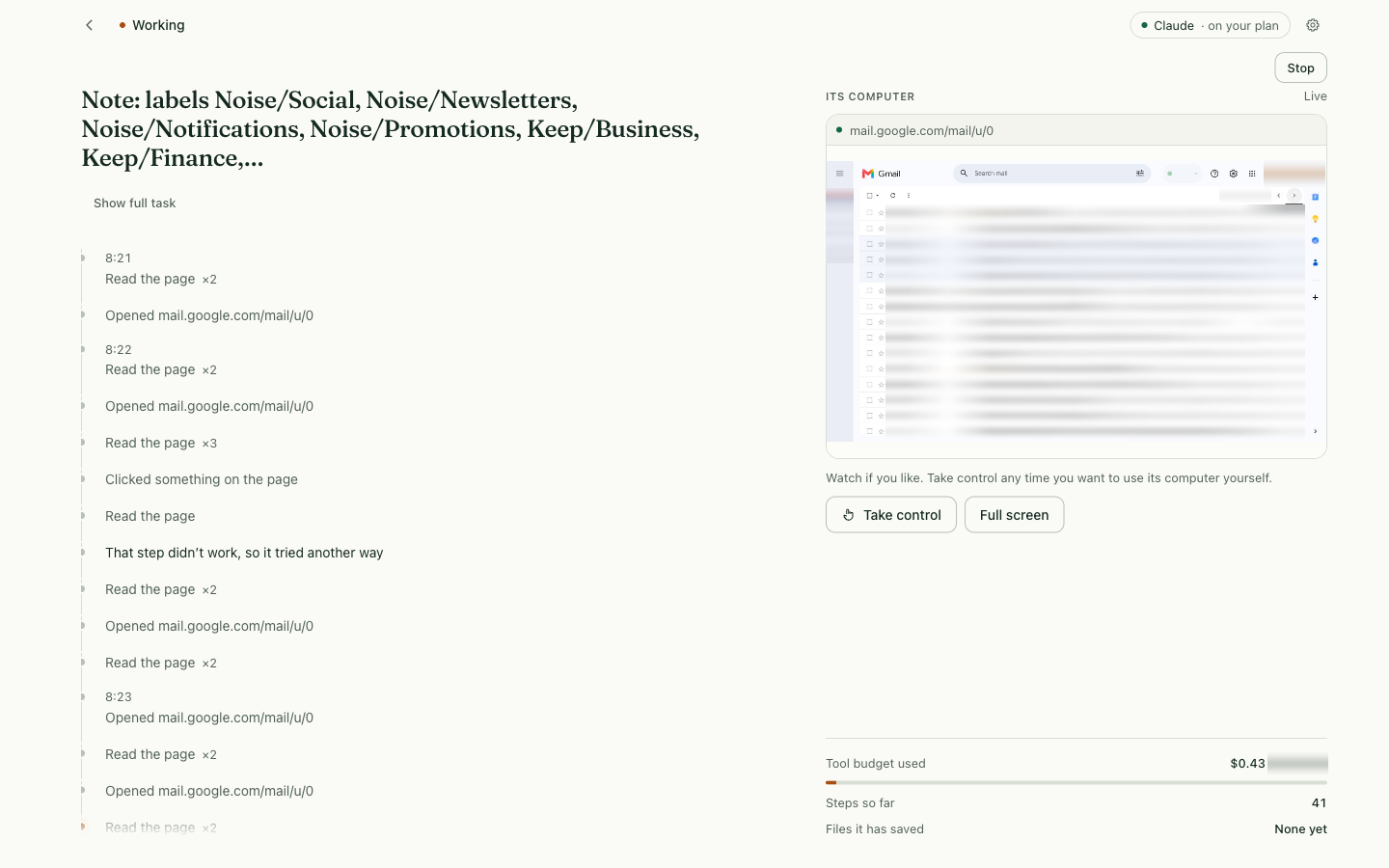
Give BotHearth a task. It opens its own browser, works through the steps, and saves the result on your machine — while you watch. When a site needs a real person, you take the keyboard.
Build from source on Mac or Linux with Docker. About 15–40 minutes. Source-available under PolyForm Noncommercial — not open source. Alpha, single operator. One business bot free, permanently. Model access and hosting are separate. The agent browses in its own containerised Chromium; it never touches your browser or your logins.
You control
Remote models still receive the task context you send.
| You control | In this alpha |
|---|---|
| Machine | Daemon on your Mac, Linux host, or a VM you operate. Browser, shell, and proxy containers. No BotHearth-hosted agent account. Laptop sleep stops local work. |
| Model account | Native: Codex (verified live) or Claude Code (listed; not yet verified live). API adapters and local endpoints are configured in YAML. BotHearth does not sell tokens. |
| Data location | Workspace, task records, audit chain, and browser profile on this computer’s volume. A fresh computer starts clean. |
| Review prompts | Off by default. Optional Settings toggle Ask before sensitive actions reviews detected sends, uploads, deletes, checkout steps, and new-site form submits taken through BotHearth’s browser tools. Expand Sensitive actions to choose which gates fire and to set API-adapter max tool calls and spend cap (0 = no limit); native Codex and Claude Code tasks have no BotHearth cap. Native CLI shell and network tools bypass those checks. Detection is incomplete. |
| Credentials / takeover | Password, OTP, passkey, CAPTCHA and payment-card fields pause for Take control. Checkout steps without a card field are optional review prompts. You type; the model is frozen and capture is blocked. Take control requests full screen; Esc leaves full screen without returning control. Passkeys generally fail inside the container browser. |
| Stopping | Stop ends the task. bothearth stop stops the daemon. There is no BotHearth quota. A task runs until it’s done, until you stop it, or until your own model plan hits its limit. Then it pauses and can resume. Closing the window is not Stop. |
| Network | Default: public web via the egress proxy. Strict mode restricts destinations. Policy is best-effort, not a firewall. |
Data privacy · Visible work · Human control
Your host stores the primary workspace, task records and browser profiles. Remote models still receive the context you submit. Know the boundary before handing over a task. The agent browses in its own Chromium inside a container. It never touches your browser or your saved logins.
Run on your Mac, Linux computer or a prepared Linux VM. Choose the host, storage, network access and backups. BotHearth does not require its own hosted agent account.
Codex is verified live. Claude Code is listed, not yet verified live. API adapters and local endpoints are a separate YAML path. Provider terms, processing and charges still apply; self-hosting is not a promise of zero data egress.
See the browser. Take control when a site needs you. Enable optional review prompts in Settings for detected BotHearth-tool actions. Pause or stop work.
A recorded test
Private details blurred. Not an independent benchmark.
What will you ask it to do?
A topic to research, current options to compare, or a website to improve. Give it the pages and say what you want back.
“Read these pages about a topic I’m learning. Make me a brief with the key points and sources.”
A brief you can come back to COMPARE YOUR OPTIONS“Compare the options on these pages. Pull out the differences and anything I should check.”
A comparison to help you choose AUDIT YOUR WEBSITE“Browse my website. Find the questions it leaves unanswered and suggest the five best fixes.”
An audit with page links and concrete changesA task, from start to finish
BotHearth puts the request, the agent’s actions, and its saved files in one place. Here is a small task you can try yourself.
Illustrated workflow · audit your public website
Browse my public pages, identify unanswered customer questions, and suggest changes I can review.
Try the website auditFive changes to review
Affected page · observed issue
Suggested change · how to check it
Review the saved audit against your live pages and product before publishing any change.
Follow the live browser beside a feed of what the agent opens, reads, and saves. Check where it is headed as the task unfolds.
Enable optional review prompts in Settings. When a site needs your sign-in, take control yourself (full screen; Esc leaves it), then give it back to continue.
When a task saves a file, open it from the result view. Read the summary, inspect the source, or check the numbers before using them.
See how a task works Understand the controls and their limits
Limited-time enterprise offer
One perpetual business bot per organisation. Sell the work it creates. Additional bots: US$99 US$49 each, once. Limited-time introductory offer — over 50% below the planned standard price. Payment collection is not open yet. Commercial outputs are allowed; hosting a copy of the service requires a separate agreement. The published first-installation grant needs no registration and survives withdrawal of the offer for future grants. Certificate issuance is not open yet.
Your next task starts here
Set up BotHearth, connect your model account, and try a task of your own.
Build from source on Mac or Linux with Docker. About 15–40 minutes. Free under the business offer. Model access is separate.